What Is LockedCode?
LockedCode is a security-hardened fork of OpenCode, the open-source AI coding agent with over 150,000 GitHub stars and 6.5 million monthly users. OpenCode lets LLMs read files, write code, run shell commands, and autonomously build projects in your workspace. It's fast, flexible, and provider-agnostic.
It's also entirely trust-based. The LLM proposes an action, the developer gets a confirmation prompt, and the action executes. There are no hard boundaries on what the agent can access, no scanning of what it produces, no audit trail of what it did, and no protection against what it sends to the model provider. For solo developers using frontier models from trusted providers, that's fine.
For corporate development teams — especially those using open-source, self-hosted, or offline models to manage token costs — it's a non-starter.
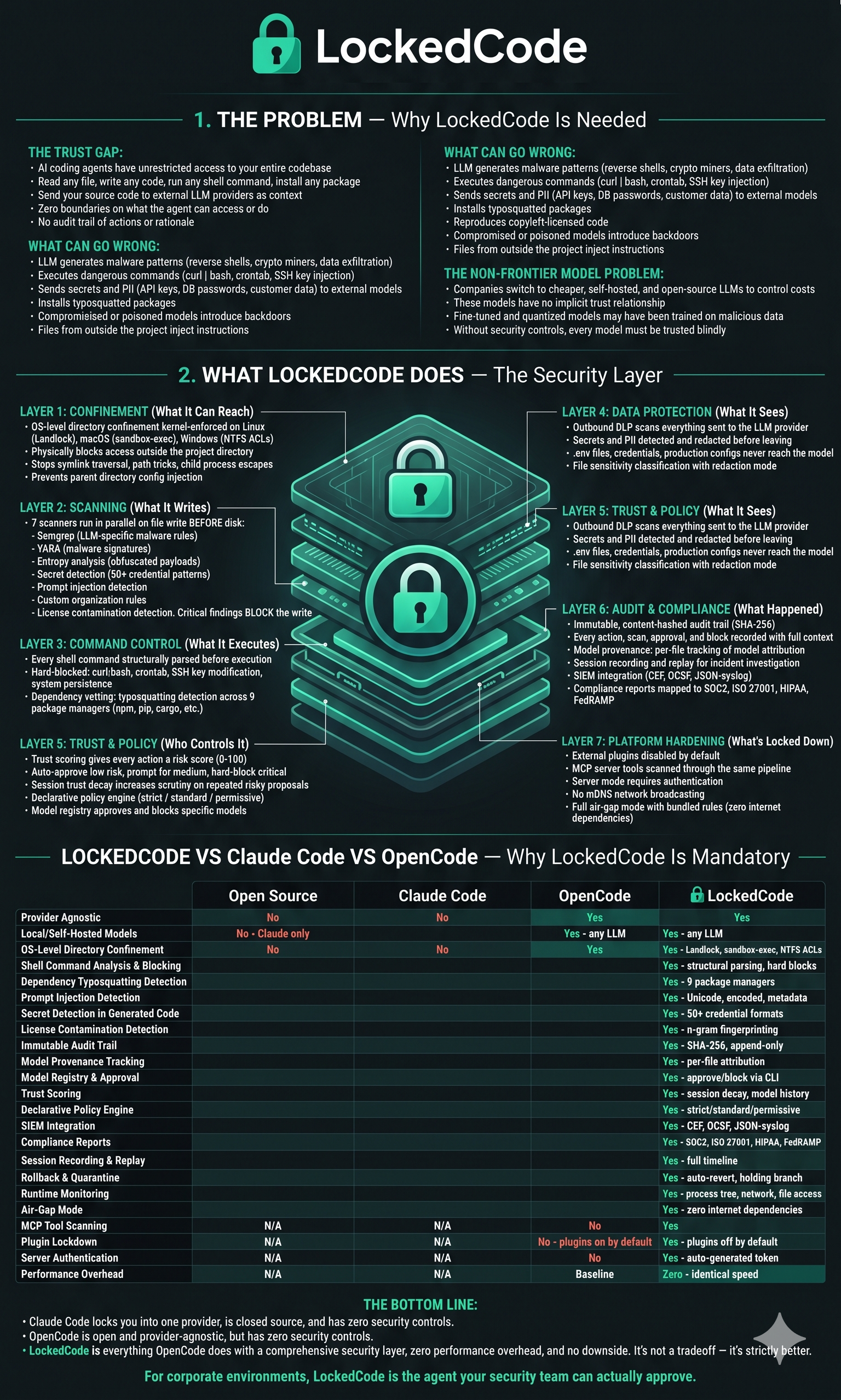
LockedCode fixes this. It adds a comprehensive security layer between the LLM's intent and the agent's execution. Every file write passes through static scanning. Every shell command is parsed and analyzed. Every outbound context payload is checked for secrets and PII. Every action is confined to the project directory at the operating system level. Everything is logged in an immutable audit trail. Every security decision is configurable via declarative policy. Every model that touches your code is tracked. Every compliance requirement is documented. And when something goes wrong, you can roll back to safety.
LockedCode is not a wrapper around OpenCode. It is OpenCode — every feature, every provider integration, every TUI capability — with a security layer that adds zero performance overhead. Same speed. Same workflow. Full protection.
Why Does This Exist?
The AI coding agent market is moving fast. Enterprises are under pressure from two directions: leadership wants AI-accelerated development, and finance wants to control the token spend that comes with routing everything through frontier model APIs. The obvious solution is running smaller, cheaper, or self-hosted models — Llama, Qwen, Mistral, DeepSeek, CodeGemma, local fine-tunes.
But the moment you step outside the frontier providers, you lose whatever implicit trust came with that relationship. Nobody at Anthropic or OpenAI is deliberately shipping a model that exfiltrates your source code. Can you say the same about a fine-tuned model someone uploaded to Hugging Face last week? Or a quantized variant running on an internal GPU cluster that was trained on data nobody fully audited?
This is the gap LockedCode fills. It treats every LLM output as potentially adversarial — regardless of the model's provenance, reputation, or provider — and enforces security at every layer:
- WritesWhat the model writes is scanned for malware patterns, encoded payloads, obfuscated network calls, credential theft, and crypto mining before it touches the filesystem.
- ExecutesWhat the model executes is parsed, analyzed, and validated against the project boundary before any shell command runs.
- SeesWhat the model sees is scanned for secrets, PII, and sensitive file content before it leaves the machine.
- ReadsWhat the model reads is checked for prompt injection attacks designed to manipulate the agent's behavior.
- InstallsWhat the model installs is checked for typosquatting, suspicious post-install scripts, and package policy violations.
- ReachesWhere the model can reach is confined to the project directory at the kernel level — no amount of clever LLM output gets past a Landlock jail.
- ExtendsWhat the model extends — MCP servers and plugins — is scanned through the same security pipeline. No tool bypasses scanning, whether built-in or external.
- TrackedWhich model produced which code is recorded per-file so compromised models can be identified and their output reviewed.
- LoggedEverything that happens is recorded in an immutable, content-hashed audit trail that satisfies compliance frameworks.
Who Is This For?
Non-Frontier Model Teams
You've chosen to run Llama, Qwen, Mistral, or a self-hosted fine-tune to manage costs or keep code on-premises. LockedCode makes that decision safe.
Security-Conscious Orgs
Your CISO or security team has blocked AI coding agents because there's no way to verify what the agent produces. LockedCode is what lets them say yes.
Regulated Industries
Finance, healthcare, government, defense — environments where AI-generated code must have a provable audit trail and compliance evidence.
Air-Gapped Environments
Running local models on local hardware behind firewalls with no internet access. LockedCode works fully offline with zero cloud dependencies.
Supply-Chain Security
If you wouldn't run an unaudited third-party script against your production codebase, you shouldn't run an unverified LLM agent against it either.
Feature Overview
Directory Confinement
Every file operation is confined to the project directory tree, enforced at the OS level — not just application-level path checks.
- Linux: Landlock LSM (kernel 5.13+) with Bubblewrap fallback
- Windows: Restricted tokens, NTFS ACLs, job objects
- macOS: Process-level sandbox profiles with FSEvents monitoring
- Aggressive path canonicalization defeats symlinks, relative paths, hardlinks, junction points, and mount traversal
- Controlled escape hatch for package managers, Docker, and build tools
- No parent directory config injection — LockedCode reads config only from the project root, never from parent directories
- Process tree inheritance — child processes inherit confinement
Static Scanning Pipeline
Every piece of code the LLM proposes is scanned before it touches the filesystem. Seven scanners run in parallel.
- Semgrep integration with custom rulesets tuned for LLM failure modes
- YARA signature scanning for known malicious patterns
- Entropy analysis catches obfuscated payloads
- Secret detection across 50+ credential formats
- Prompt injection detection in ingested files
- Custom rule scanner for organization-specific patterns
- License contamination scanner flags copyleft code reproduced from training data
- Scans fire before every file write and edit — malicious code never touches disk
Shell Command Interception
Every shell command is structurally parsed and analyzed before execution.
- Structural command parsing of pipes, redirects, subshells, and command substitution
- Hard-blocked patterns:
curl | bash, crontab modification, SSH config changes - Path extraction and validation against confinement boundary
- Environment variable protection and risk scoring
Outbound DLP
Protects what goes TO the model. Prevents the agent from sending sensitive codebase content to the LLM provider.
- Secret scanning on outbound context across 50+ credential formats
- PII detection — emails, phone numbers, SSNs, credit card numbers
- File-level sensitivity policy via configurable glob patterns
- Redaction mode — replace secrets with typed placeholders so the model sees code structure without sensitive content
Prompt Injection Detection
Scans files being ingested as context for embedded instructions designed to manipulate the LLM.
- Role-override attempts and system prompt markers in file content
- Unicode manipulation — invisible characters, bidirectional overrides, homoglyphs
- Encoded instructions in comments and metadata
- Dependency metadata scanning before the model sees them
- Configurable sensitivity levels per trust boundary
Dependency Vetting
Analyzes every package the LLM tries to install before the install command executes.
- Typosquatting detection — flags packages suspiciously similar to popular ones (Levenshtein distance, scope confusion, prefix/suffix tricks)
- Post-install script risk detection
- Support for 9 package managers: npm, bun, yarn, pnpm, pip, go, cargo, gem, composer
- Configurable blocked packages and scopes via policy
Audit Trail
Every action, every scan result, every approval decision — logged with content hashes and timestamps.
- Append-only, immutable audit records
- SHA-256 content hashing for tamper evidence
- JSON-structured entries, queryable by external tools
- Session correlation from model output to actual execution
- Local SQLite storage, zero cloud dependencies
Policy Engine
Declarative, configurable security rules that drive every security decision.
- YAML/JSON configuration at the project root
- Policy hierarchy: global → organization → project → session
- Three strictness levels:
strict,standard,permissive - Model approval and blocking lists
- Sensible defaults — works out of the box without a policy file
Trust Scoring
Risk assessment for every LLM interaction, driving the approval UX.
- Per-action risk scores based on what the action does
- Score-driven UX — auto-approve, notify, require approval, or hard-block
- Session trust decay for repeated high-risk proposals
- Persistent per-model trust metrics across sessions
Model Provenance Tracking
Track which model produced which code across every session. Critical for incident response when a model is found to be compromised.
- Per-file attribution recording model, session, operation, and content hash
lockedcode provenance <file>shows full model history for any filelockedcode provenance --model <id>shows all files a model touchedlockedcode provenance --review <id>identifies all files needing review after a model compromise
Model Registry & Approval
Centralized control over which models developers can connect to.
- Organization-level approved and blocked model lists via policy
- Unapproved models are rejected before they can execute
- Partial matching — approve
gpt-4to allow all GPT-4 variants
Compliance Report Generation
Automated compliance evidence from audit trail data.
- Per-session and per-project reports mapping to SOC2, ISO 27001, HIPAA, and FedRAMP controls
- Evidence of scan coverage, approval workflows, and policy enforcement
- Exportable reports suitable for auditor review
SIEM Integration
Export audit trail events to enterprise security monitoring platforms.
- Structured event export in CEF, OCSF, and JSON-over-syslog formats
- Real-time streaming to Splunk, Datadog, Elastic, and generic syslog endpoints
- Configurable event filtering and severity thresholds
Session Recording & Replay
Full session replay for incident investigation.
- Replayable timeline of every LLM proposal, scan result, file change, and approval decision
- Visual replay interface showing the session as it happened
- Export for forensic analysis
Rollback & Quarantine
Automated response when a security issue is detected after code is written.
- Quarantine flagged changes to a holding branch
- Automatic working tree revert with scan results and remediation guidance
- Configurable auto-rollback policy by finding severity
License Contamination Detection
Protects against IP liability from LLM-generated code that reproduces copyleft-licensed open-source code.
- Code fingerprinting against known open-source code bodies
- License classification — permissive, copyleft, proprietary
- Configurable policy for handling matches
Custom Rule Authoring
SDK for security teams to write organization-specific scanning rules without forking LockedCode.
- JSON rule definition format supporting content, command, filename, and outbound patterns
- Built-in test framework:
lockedcode rules testvalidates rules against test cases - Custom rules merge with bundled rules — override built-in patterns by ID
lockedcode rules listshows all active rules with sources
Runtime Monitoring
OS-level behavioral monitoring of what actually happens during execution, beyond static scanning.
- eBPF-based syscall monitoring on Linux — file opens, network connections, process spawning
- Process tree analysis for unexpected child processes
- Network activity detection for connections to unexpected destinations
Multi-Agent Security Cascade
Security policies cascade to all sub-agents with no privilege escalation.
- Policy inheritance — child agents inherit parent security
- No privilege escalation — sub-agents can never exceed parent permissions
- Audit trail linkage with parent-child relationship markers
MCP Tool Scanning
External MCP server tools pass through the same security pipeline as built-in tools. No backdoor around scanning.
- File writes from MCP tools are scanned by the full scanning pipeline
- Shell commands from MCP tools go through command analysis
- MCP tool results recorded in the audit trail
Plugin Lockdown
External plugins are disabled by default. Security tools should not load unverified code.
- Pure mode (no external plugins) is the default — opt in explicitly with
--allow-plugins - When plugins are loaded, a security warning is logged
Server Authentication
Web and headless server modes require authentication. A security tool should not be remotely controllable without credentials.
- Random auth token generated on startup for web and serve modes
- All requests require
Authorization: Bearerheader - Warning when binding to non-localhost addresses
- No mDNS service discovery — LockedCode never advertises its presence on the network
Air-Gap Mode
Full functionality with zero internet access. No cloud dependencies, no telemetry, no phone-home.
- Bundled Semgrep rules, YARA signatures, and detection patterns
- Centralized rule resolver with versioned manifest
- Startup compliance verification for air-gap environments
- Offline rule set updates via versioned packages
Installation
# npm (recommended)
npm i -g lockedcode@latest

# Homebrew (macOS and Linux)
brew install LockedCodeAI/tap/lockedcode

# Scoop (Windows)
scoop install lockedcode

# Direct binary
# Download from https://github.com/LockedCodeAI/lockedcode/releases
Desktop App
LockedCode is also available as a desktop application. Download from the releases page or lockedcode.ai/download.
| Platform | Download |
|---|---|
| macOS (Apple Silicon) | lockedcode-desktop-mac-arm64.dmg |
| macOS (Intel) | lockedcode-desktop-mac-x64.dmg |
| Windows | lockedcode-desktop-windows-x64.exe |
| Linux | .deb, .rpm, or .AppImage |
# macOS (Homebrew)
brew install --cask lockedcode-desktop

# Windows (Scoop)
scoop bucket add extras; scoop install extras/lockedcode-desktop
Installation Directory
The install script respects the following priority order:
$LOCKEDCODE_INSTALL_DIR— Custom installation directory$XDG_BIN_DIR— XDG Base Directory Specification compliant path$HOME/bin— Standard user binary directory$HOME/.lockedcode/bin— Default fallback
# Examples
LOCKEDCODE_INSTALL_DIR=/usr/local/bin curl -fsSL https://lockedcode.ai/install | bash
XDG_BIN_DIR=$HOME/.local/bin curl -fsSL https://lockedcode.ai/install | bash
Post-Install: Security Capability Check
After installation, run:
lockedcode security-checkThis reports the security capabilities available on your platform: confinement backend, scanner availability, policy file detection, and air-gap mode status.
Quick Start: Security Configuration
LockedCode works out of the box with sensible defaults. For custom configuration, create a lockedcode.json at your project root:
security:
  strictness: standard          # strict | standard | permissive

  confinement:
    pre_approved_paths:
      - ~/.npm                  # npm cache
      - ~/.bun                  # bun cache
      - /tmp                    # temp directory

  scanning:
    semgrep: true
    yara: true
    entropy: true
    secrets: true

  dlp:
    redaction_mode: true        # redact secrets instead of blocking files
    sensitivity_patterns:
      - "**/.env*"
      - "**/credentials.*"
      - "**/config/production/**"

  trust:
    auto_approve_below: 20      # auto-approve low-risk actions
    prompt_above: 50            # require approval for medium+ risk
    block_above: 90             # hard-block critical risk

  models:
    approved:                   # empty = all allowed
      - claude-sonnet-4
      - gpt-4o
    blocked:
      - untrusted-model-v3

  audit:
    retention_days: 90
Agents
LockedCode includes the same built-in agents as OpenCode, with security policies applied to all of them:
- buildDefault, full-access agent for development work. All actions pass through the security layer.
- planRead-only agent for analysis and code exploration. Denies file edits by default. Asks permission before running bash commands. Security scanning still applies to any approved operations.
- generalSubagent for complex searches and multistep tasks. Invoked using
@generalin messages. Security policies cascade with no privilege escalation.
Relationship to OpenCode
LockedCode is a standalone project built on OpenCode (MIT License). It selectively merges upstream features and fixes. All original OpenCode capabilities — provider integrations, TUI, LSP support, client/server architecture — are preserved, with security-incompatible features removed or hardened (mDNS removed, plugins disabled by default, server auth required, parent directory config injection eliminated).
LockedCode adds a comprehensive security layer with zero performance overhead — same speed, same capabilities, plus confinement, scanning, auditing, and compliance. The only things removed from the upstream are security vulnerabilities: mDNS network broadcasting, parent directory config injection, and unrestricted external plugins.
There is no tradeoff. LockedCode is OpenCode with security. Nothing is slower, nothing is missing, nothing is harder to use. You get verifiable evidence that the agent can't do anything it wasn't supposed to — for free.
vs OpenCode
Everything OpenCode does, plus — with zero performance overhead:
- OS-level directory confinement (Landlock, sandbox-exec, restricted tokens)
- Seven-scanner static analysis pipeline (Semgrep, YARA, Entropy, Secrets, Injection, Custom, License)
- Shell command structural parsing and analysis before execution
- Outbound DLP preventing secrets and PII from reaching the model
- Prompt injection detection on ingested files
- Dependency vetting with typosquatting detection
- Immutable, content-hashed audit trail
- Declarative policy engine with configurable strictness
- Trust scoring with session decay and model trust history
- Model provenance tracking — know which model wrote which code
- Model registry with approval and blocking lists
- Compliance report generation for SOC2, ISO 27001, HIPAA, FedRAMP
- SIEM integration (Splunk, Datadog, Elastic)
- Session recording and replay for incident investigation
- License contamination detection
- Rollback and quarantine for automated response
- Custom rule authoring SDK
- Runtime monitoring (eBPF)
- Multi-agent security cascade
- MCP tool scanning — external tools go through the same security pipeline
- Plugin lockdown — external plugins disabled by default
- Server authentication — web and serve modes require auth tokens
- No mDNS service discovery — never advertises presence on network
- No parent directory config injection — reads config only from project root
- Full air-gap mode with bundled rule sets
vs Claude Code
Everything that differentiates OpenCode from Claude Code, plus the full security layer above:
- 100% open source
- Not coupled to any provider — works with Claude, OpenAI, Google, or local models
- Security layer that treats every model as potentially adversarial
- Built-in opt-in LSP support
- Terminal-first TUI, built by neovim users
- Client/server architecture allowing remote operation from a mobile app
Documentation
For more info on how to configure LockedCode, including detailed security configuration, policy authoring, and platform-specific confinement setup, head over to our docs.
Contributing
If you're interested in contributing to LockedCode, please read our contributing docs before submitting a pull request. Security-related contributions — new scanner rules, confinement improvements, and audit trail enhancements — are especially welcome.
License
LockedCode is licensed under the MIT License. It includes attribution to the original OpenCode project by anomalyco.